
Learn AI With Me: AI-Generated Video
Day 6, in which a friend rants at me and I turn it into a video

At the end of last week, I got a voice message from a friend. I knew instantly that I should share it here. My first step was to transcribe it.
I’ve been using Descript for this recently, so I dropped the audio file into Descript and within a few seconds, I had a complete and accurate transcript. Then I remembered that Descript is designed for much more than this. It’s video editing tool, and it also has generative AI capabilities that let you add AI-generated voice and video to your projects.
I decided to lean in and let Descript create video for my friend’s rant. I also decided to obscure my friend’s identity by replacing the original audio with an AI-generated voice track. Here’s the result.

I Didn’t Touch A Single Control
The most interesting thing about Descript to me is that it offers a well-integrated hybrid user interface. You can use it the way you use a standard video-editing tool. (It has some unique elements in the way it’s set up, notably the text-centric editing model.) But you can also prompt Descript’s AI to do things for you. “Underlord” as they call it is capable of doing anything that Descript can do, but it will do it on your behalf. So, instead of trying to figure out how to add AI-generated talking heads to my video, I just asked Underlord:
“Can I add an AI-generated talking head to this video?”
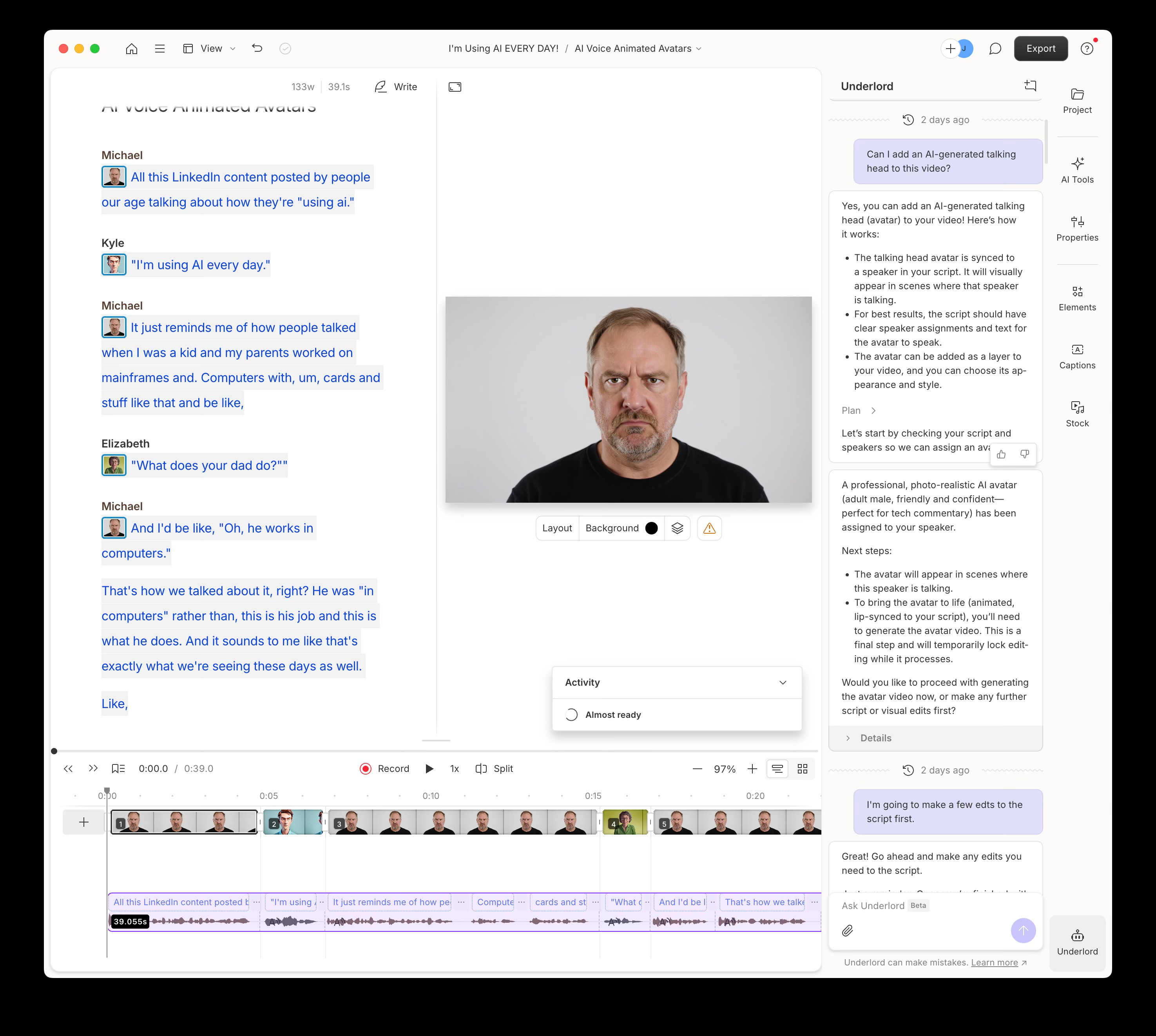
Underlord came back with an explanation, and let me know that that the feature is called Video Avatars. It then offered to create them for me. When I said, “Yes please,” (I’m always polite to chatbots,) it went ahead and built out Video Avatars for the whole thing. Although I could have done this through direct manipulation of user-interface elements, I never did.
Three Interaction Models
Model 1: Prompt-driven. Last week, I looked at tools that were entirely prompt-driven. You give them a prompt, they give you output, you edit that output with more prompts.
Model 2: Prompt-driven, editable output. I also looked at tools where the output is editable directly, though many of those created code as output, which you’d need to take into a code editor (or use the built-in code editor) to edit the output.
Model 3: Prompt/Native hybrid. Descript is something different though. It’s a fully capable prompt-driven tool that can also take turns editing with you. You can prompt Underlord and it returns results to a fully-capable application UI. You can use the tools in the user interface, or you can prompt, or you can go back and forth.
This strikes me as an entirely new paradigm, one that I hope we’ll see more of. It feels like a really great way to get the most out of sophisticated tools like Descript while also respecting the specialized knowledge and skill of users who are expert in their domains. I look forward to seeing this paradigm showing up in tools like the Adobe Suite, in Figma, etc.
What about Figma, you ask? From what I can tell, Figma might be heading in this direction, but it’s not there. Instead, they seem to be adding an individual prompt-driven tools to the interface, one feature at a time. (If I’m wrong here, please correct me.)
Oh, and that rant…
Yeah, I’m guilty of “using AI. I’m using it every day!” Hopefully, at some point it just becomes another technology that disappears into our landscape of tools. For now though, it’s doing so many new things that I think these kinds of tech-centric experiments are useful.
Are you using tools that have build AI into the user interface? Who is doing it well? Where does it feel like an awkward bolt-on? Let me know in the subscriber chat.